
Guided torque assembly
Connect every critical tightening result to the product being built.
Assembly360 guides operators from VIN scan to component and bolt completion, captures OK/NOK tightening results, and gives production and quality teams a product-level record they can review and report.
VIN-linked evidenceOK/NOK historyAudit-ready reporting
Interactive previewEvidence
VIN-guided work
Start the correct product record before tightening begins
Bolt-level result capture
Preserve target torque, applied torque, result, and time
Production + quality visibility
Review controller status, recent activity, trends, and reports
Why this matters
A tightening result is useful only when the team can connect it to the right product and operation.
Assembly360 brings product identity, controller results, operator context, and exception history together without replacing the customer’s approved quality process.
Designed forproduction, quality, automation, and plant teams
Scattered evidence01
Controller results and product details are difficult to review together.
Manual records, product identity, and tightening outcomes lose value when the team cannot connect them quickly.
Assembly360 outcomeKeep the product and its critical tightening history in one reviewable record.
Sequence uncertainty02
Operators need the current product, component, bolt, and state to stay visible.
The operator HMI keeps the approved tool, target torque, progress, guidance, and latest state in view.
Assembly360 outcomeGuide the configured workflow without asking the operator to guess the next action.
Slow investigation03
Quality teams lose time reconstructing NOK and incomplete work.
An NOK, retry, repair, replacement, scrap decision, and approved result should remain visible in the product history.
Assembly360 outcomeReview the exception with its product and process context intact.
The Assembly360 layer
One operating picture—from controller connection to product-level evidence.
Connect the shop-floor events that matter: controller state, product identity, component progress, tightening result, operator guidance, Process Intelligence, and report evidence.
VIN-2026-0012412 / 12 OK
- Product
- Rear suspension assembly
- Tool / Pset
- TW-200 · PS-12
- Torque
- 48.2 Nm · OK
- Captured
- 10:32 AM · Shift A
Bolt 10 approvedTorque and angle within range
Bolt 11 retry recordedNOK retained in history
Report readyEvidence linked to product
Public-safe product views
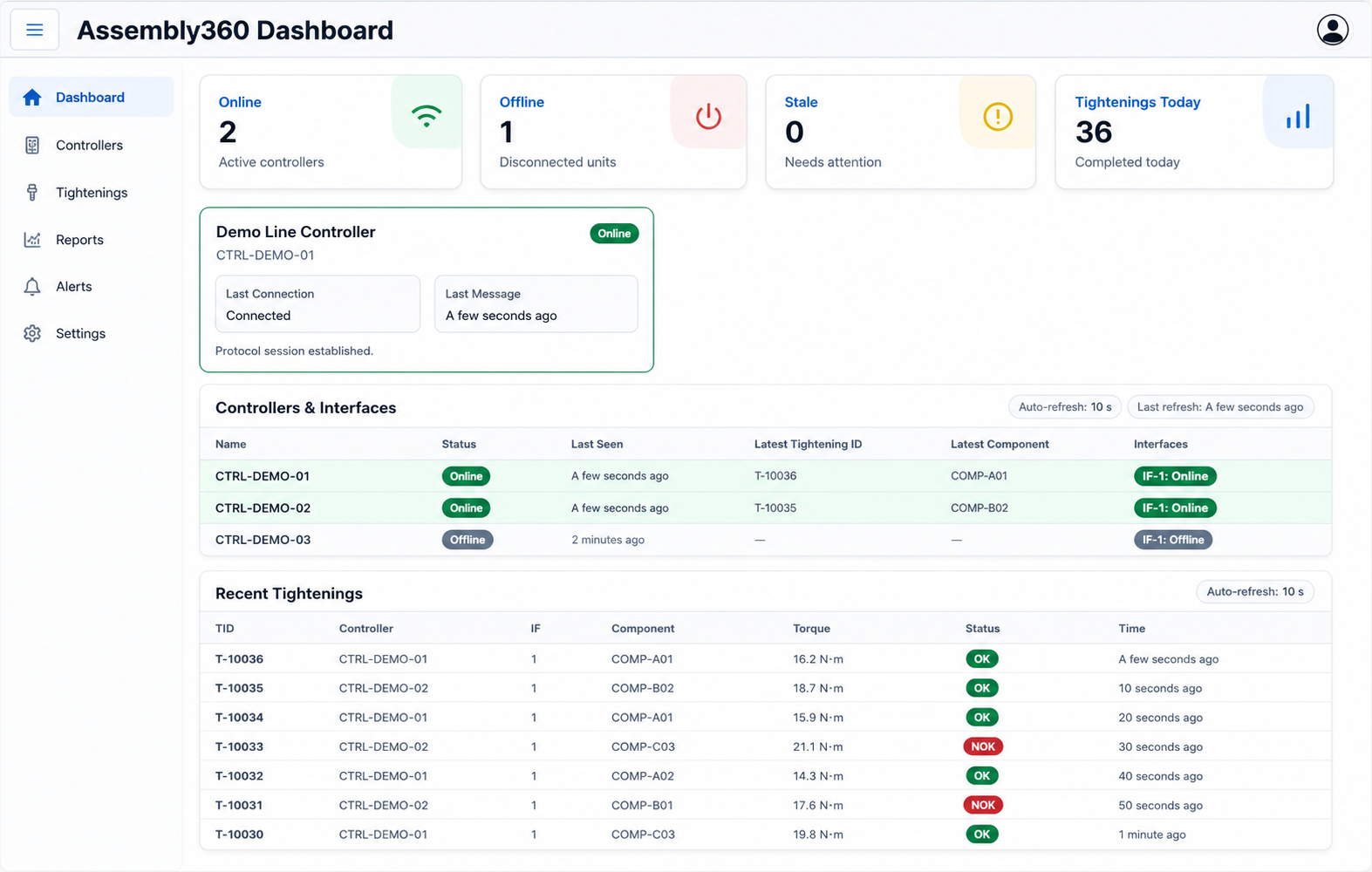
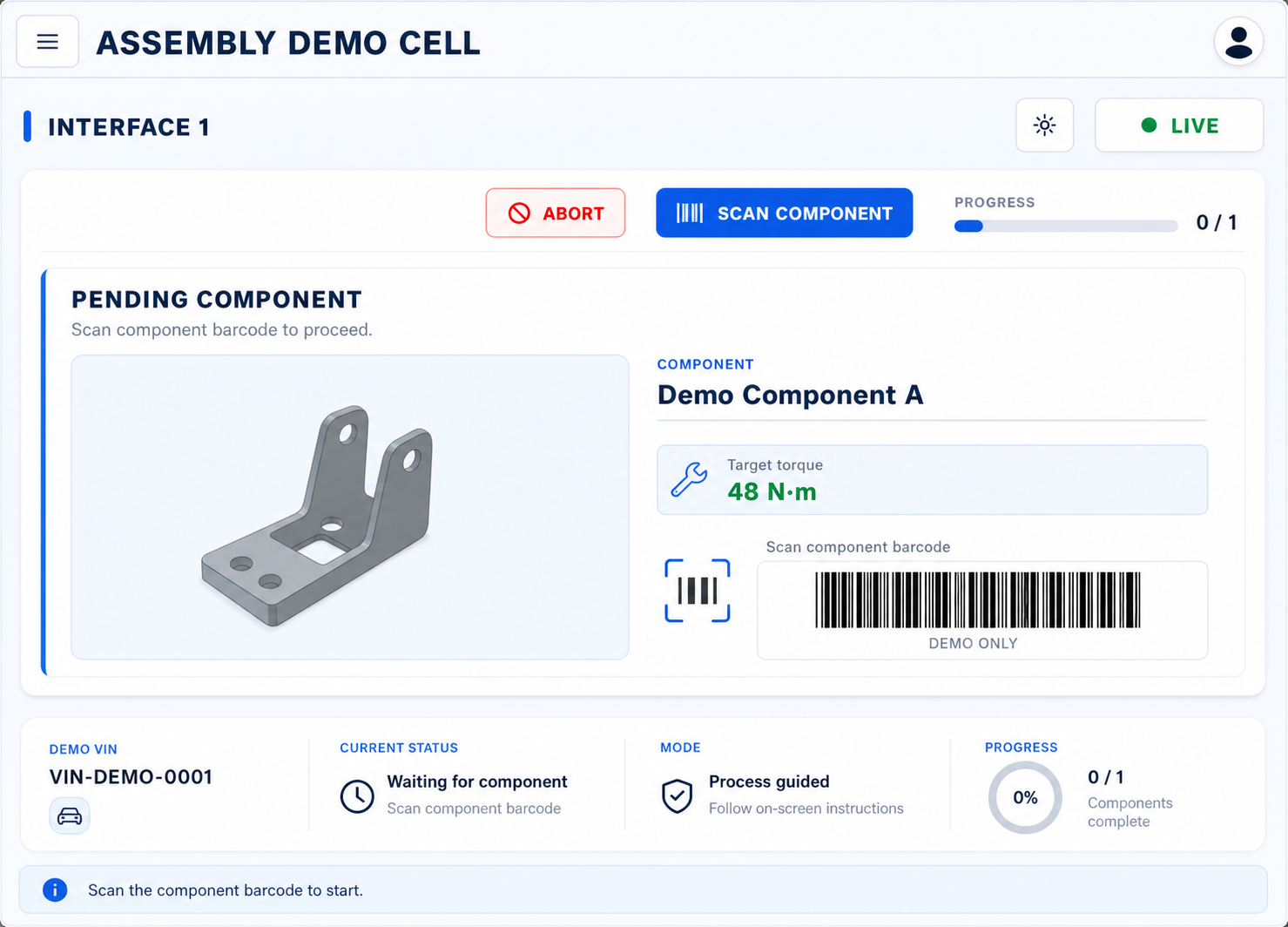
See the operator workflow and production picture.
These demo views use fictional identifiers and values to explain the product without exposing customer data or proprietary process logic.
Operating model
Configure → Identify → Guide → Capture → Review
Assembly360 connects station setup, operator guidance, controller results, and quality review into one practical production workflow.
Configure
Define products, components, target values, batches, approved tools, sequences, and required records.
Identify
Scan or enter the VIN or assembly ID and confirm that the physical product matches the HMI.
Guide
Present the pending component, current bolt, target torque, tool, progress, and approved next step.
Capture
Record OK/NOK outcomes, torque, angle, result time, and the relevant product context.
Review
Use dashboards, Process Intelligence, result history, and reports to investigate and document the assembly.
Core capabilities
View features Core capabilities for connected assembly evidence.
A focused set of tools for teams that need better visibility, dependable records, and fewer uncertain conversations after a product leaves the station.
Controller and Interface Status
Review controller and interface status while capturing supported tightening outcomes in the local Assembly360 runtime.
Guided Operator HMI
Show the active VIN, component, current bolt, target torque, tool, progress, and operational state on the shop floor.
Product-Level Traceability
Connect each product instance with component, bolt, target torque, applied torque, result, and time.
OK/NOK and Retry History
Preserve failed attempts, retries, and approved repair, replacement, or scrap context for later review.
VIN and Product Reports
Generate searchable product-level evidence for review, investigation, export, and audit preparation.
Process Intelligence
Review OK rate, NOK trends, Pareto views, torque distributions, and component-level performance.
Business outcomes
View Scenarios Clearer handovers, faster retrieval, and more consistent review.
Teams get connected evidence without unsupported promises about defect prevention, compliance, or measured savings.
Keep the active product, component, bolt, tool, and current state visible in the HMI.
Search product and tightening history together instead of rebuilding it from separate records.
Review OK/NOK events, completion status, trends, and report evidence in one application.
Ready to map your assembly workflow?
Request demo See Assembly360 with one of your real assembly workflows.
Share your controller setup, product-identification method, tightening sequence, and reporting requirement. We’ll make the demonstration relevant to your line.